
Download Light AI – Free Text‑to‑Image Generator, Secure Online Design Tool
Overview
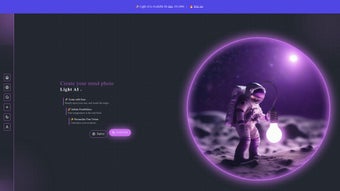
Light AI is a cloud‑native, web‑based application that transforms plain‑language prompts into high‑resolution visual assets in just a few seconds. Powered by Hugging Face’s stable Diffuse engine, the platform combines cutting‑edge diffusion models with an intuitive interface that removes the need for expensive hardware or complex software installations. Whether you’re a freelance designer needing rapid mock‑ups, a marketer looking for eye‑catching social media graphics, an educator creating visual teaching aids, or simply a hobbyist eager to explore AI‑driven art, Light AI delivers a secure, ad‑free experience that works on any device with a modern browser.
The service emphasizes privacy: prompts are processed on secure servers and are not stored longer than the session requires, ensuring that your creative ideas remain yours alone. In addition to the core text‑to‑image engine, Light AI offers automatic background removal, granular color tuning, and a library of artistic filters that can be applied with a single click. Users can also join a vibrant community hub where they share prompt libraries, showcase finished pieces, and exchange tips for getting the most out of the AI models.
Because the platform is completely free and does not embed watermarks, you can download your creations for commercial or personal use without worrying about hidden fees or licensing restrictions. Light AI’s combination of powerful generation, privacy‑first architecture, and cross‑platform accessibility makes it a standout tool for anyone who needs high‑quality visuals quickly and securely.
Key Features & Benefits
- Text‑to‑Image Generation: Convert any descriptive sentence into a high‑quality image in seconds.
- Automatic Background Removal: Instantly isolate subjects for clean compositions or further editing.
- Color Tuning & Filters: Adjust hue, saturation, and brightness, or apply artistic filters to match brand palettes.
- Multiple AI Models: Choose from a range of diffusion models optimized for realism, illustration, or abstract styles.
- Ad‑Free Interface: Focus on creation without interruptions or distractions.
- Collaboration Hub: Share generated images, prompt libraries, and design tips with a global community.
- Privacy‑First Architecture: No personal data is retained; all processing occurs securely on the server.
- Free Access & Unlimited Exports: Download your creations in PNG or JPEG format without watermarks.
Why Light AI Stands Out
Most AI image generators impose pay‑per‑render models or embed branding that detracts from professional use. Light AI flips that paradigm by offering a completely free service while still delivering premium‑grade results. Because the engine runs on Hugging Face’s stable Diffuse infrastructure, you benefit from continuous model updates, faster inference times, and a community‑driven roadmap that prioritizes real‑world feedback.
The automatic background removal feature alone can shave hours off a typical design workflow, allowing creators to focus on composition rather than tedious masking. Additionally, the color tuning tools are calibrated to preserve the integrity of AI‑generated textures, ensuring that the final output looks natural and print‑ready. Whether you need a quick blog header, a product mockup, or a stylized illustration for a presentation, Light AI’s versatile feature set makes it a one‑stop solution for visual content creation.
The platform also supports batch generation, enabling users to produce multiple variations of a concept with just a few clicks, which is especially useful for A/B testing in marketing campaigns. Finally, the built‑in community gallery provides inspiration and a quick way to discover effective prompts, accelerating the learning curve for newcomers while offering seasoned creators fresh ideas.
Installation, Usage & Compatibility
Light AI is a cloud‑based web application, so there is no traditional installation process. Simply open a supported browser—Chrome, Firefox, Edge, or Safari—on any device, and you’re ready to start generating images. The platform is fully responsive, meaning it adapts to desktop monitors, laptops, tablets, and smartphones without sacrificing functionality. Because all heavy computation occurs on remote servers, you don’t need a dedicated GPU or high‑end CPU, making it an ideal solution for users with modest hardware.
Step‑by‑Step Guide to Get Started
- Visit the Website: Go to lightai.huggingface.co and click “Start Generating.”
- Create an Account (Optional): You can work anonymously, but signing up unlocks prompt history, saved collections, and community participation.
- Enter Your Prompt: Type a clear, descriptive sentence. For example, “a futuristic city skyline at sunset, ultra‑realistic, high detail.”
- Select a Model: Choose from “Realistic,” “Illustration,” or “Abstract” based on the desired visual style.
- Adjust Settings (Optional): Use sliders for resolution, guidance scale, and seed to fine‑tune the output.
- Generate: Click “Render.” The AI returns a high‑resolution image within seconds.
- Edit & Export: Apply background removal, color tweaks, or filters directly in the interface, then download the final file in PNG or JPEG.
Operating System Compatibility
Light AI works on all major operating systems that support a modern web browser, including Windows 10/11, macOS Monterey and later, Linux distributions with Chromium‑based browsers, Android 9+ and iOS 13+. Because the service runs entirely online, there is no need to manage local updates; the platform automatically incorporates the latest AI model improvements and security patches.
Best Practices for Optimal Results
- Use precise language: Specific adjectives (e.g., “vibrant,” “minimalist”) guide the model toward the desired aesthetic.
- Leverage seed control: Re‑using a seed number reproduces the same image, useful for iterative design.
- Combine post‑processing: After export, you can further refine images in Photoshop, GIMP, or other editors for print‑ready quality.
- Stay within community guidelines: Avoid prompts containing copyrighted material or explicit content to maintain a safe environment.
- Monitor server load: During peak times, render speeds may vary; consider generating during off‑peak hours for faster results.
Pros, Cons, Frequently Asked Questions & Final Thoughts
Pros & Cons
- Pros:
- Completely free with no hidden fees or watermarks.
- Ad‑free, clean UI that prioritizes creativity.
- Automatic background removal saves time.
- Cross‑platform compatibility via web browser.
- Strong privacy policy—no long‑term data storage.
- Community gallery encourages idea sharing.
- Cons:
- Dependent on internet connectivity; offline use is not possible.
- Render speed may vary during peak server load.
- Advanced users may miss deeper customization found in desktop‑only tools.
FAQ – Your Questions Answered
Is Light AI really free, or are there hidden costs?
Light AI is 100 % free for both personal and commercial use. There are no subscription tiers, no watermarks, and no pay‑per‑render fees. All features—including background removal and export options—are available without charge.
Can I use the generated images for commercial projects?
Yes. Light AI grants users full ownership of the images they create, allowing unrestricted commercial use such as marketing materials, product mockups, or merchandise designs.
How does Light AI handle my privacy and data?
The platform processes prompts and images on secure servers and does not retain personal data after the session ends. No user‑generated content is stored permanently unless you explicitly save it to your account or download it.
What image resolutions can Light AI produce?
Standard renders are produced at 512 × 512 px, with options to upscale to 1024 × 1024 px or higher using the built‑in upscaler. Higher resolutions may require longer processing time but remain free.
Do I need an account to use Light AI?
No. You can generate images anonymously. Creating an account simply adds features like prompt history, saved collections, and participation in the community gallery.
Conclusion & Call to Action
Light AI delivers a compelling blend of power, simplicity, and affordability that few AI‑driven design tools can match. Its web‑first approach eliminates hardware barriers, while the rich feature set—from instant background removal to a diverse library of visual effects—makes it valuable for both professionals and casual creators. With no ads, no subscription fees, and a clear commitment to privacy, the platform stands out as a trustworthy, future‑proof solution for anyone who needs high‑quality images on demand. Ready to transform your ideas into stunning visuals? Start generating with Light AI today and experience the speed and creativity of AI‑powered design.



.png)



